
Author one small game map
Make one room with permitted tiles, keep editable files and test the export with your existing map system.
Optional editor: Tiled Map Editor · by Thorbjørn Lindeijer and Tiled contributors · Original creator & download ↗
Checked 10 October 2026. Native export/render evidence and remaining acceptance are listed with the sample below. Your game importer, gameplay and target need separate tests.
- STEP 1
Choose one room and keep your working tools
Use a copy or test branch of your game. Keep a working engine-native tile editor and BINX authored-room generator. Tiled is optional when you need an external editor. Record engine/importer version, target, supported format, tile size and orientation before drawing.
This example is 10 × 6 orthogonal cells with 32 × 32 tiles: a 320 × 192 room. It has a floor, boundary walls and one point marker. Use your game’s actual dimensions when they differ.
Check: A safe project and supported import path are defined.
- STEP 2
Draw with your own or permitted tiles
In Tiled 1.12.2 choose File → New → New Map (Ctrl+N). Select Orthogonal, 32 × 32 tile size, 10 × 6 map size and a finite map. Use File → New → New Tileset, choose your permitted tile image and keep Embed in map unchecked to save an external TSX. Our original tiles.png has 2 columns, 32-pixel cells and zero margin/spacing.
Create Floor and Walls tile layers. Fill the floor and paint the boundary walls. Add a Markers object layer, choose Insert Point and place PlayerSpawn at x=80, y=80. Set a string custom property purpose to player_spawn. Save room.tmx beside tiles.tsx and tiles.png.
Check: The map reopens with both tile layers and the named point.
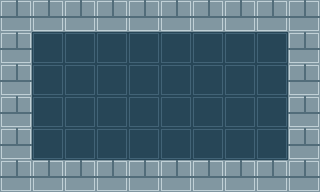
Tiled-rendered original Forge room. The spawn marker is data in the Markers object layer; inspect its coordinates and purpose separately. - STEP 3
Export a format your importer supports
Use File → Export As and select your project’s documented format. Keep the editable TMX, TSX and image even after export. JSON retains map structure; it is not the Forge sprite-sheet JSON schema. An external tileset export still references tiles.tsx, so an importer must support that reference or its documented alternative.
CSV exports tile layers separately, not complete object/property data. Multiple tilesets can make local IDs ambiguous, empty cells use -1 and flip flags need decoding. Lua omits custom-property types and object-template information. Never treat “file exported” as “engine integration passed”.
Check: Layers, tileset paths and required object properties survive the actual reader.
- STEP 4
Load it through the existing engine workflow
Use your existing importer. Check tile size, layer order, global IDs/flip flags and object coordinates. Test collision separately: a wall drawing is not a physics wall. Instantiate a spawn marker through your current gameplay system; custom properties alone do not spawn a player.
Tiled’s built-in Godot 4 TSCN exporter is an option when that workflow fits. Keep matching file hierarchy and an existing Godot project root. Objects require a string resPath pointing to an existing scene or they are not exported; the example PlayerSpawn is a data marker, not a ready player. Image-collection tilesets and image layers are unsupported by this exporter. Check collision layers/masks and actual bodies in your engine.
Check: One intended wall or spawn behaviour works in the actual engine.
- STEP 5
Run, reopen and test the target
Start twice, close/reopen the project and test a build on the intended target. Check entry/exit, the boundary, deliberate collisions, marker placement and missing companion files. Change one interior tile, re-export and confirm the game actually loads the change.
Keep editable sources, exports, versions, rights notes and observed failures. A rendered room does not establish navigation, performance, gameplay or target-device acceptance.
Check: The room survives reload and recorded engine/target checks pass.
Plan this map step with your AI
Review the public facts and copy manually if needed. Private project files are not included.
Review the workflow prompt
Official instructions and remaining checks
Map export and command-line scope ↗
Godot 4 exporter and object limits ↗
Interactive editor, browser/clipboard/assistive/device checks and production account launch remain OPEN. Existing BINX room systems are preserved.
Draw original sprites · Use your existing Godot project · Import a permitted ready-made asset