
Create one asset for your game
Make one original prop, export a supported file and test it in your current engine. Keep the editable source and start with a copy of your project.
Editor: Blender · Original creator & download ↗
Source-reviewed Blender 5.2 instructions, checked 9 October 2026. Your Blender export and engine integration need testing; the linked Godot 4.5 OBJ sample has separate existing evidence.
- STEP 1
Choose one small prop
Keep your current engine and working game systems. Use a copy or test branch of your project. Pick one static crate or simple obstacle; leave characters, rigs and animation for later.
Write down your editor version, engine version, target device and accepted import format. Blender is an editing tool: you create the asset here, rather than install a ready-made pack.
Check: You have a safe test project and one clearly defined prop.
- STEP 2
Make and save the original
In Blender, start with a mesh cube from Add → Mesh. Change its proportions into a simple crate and name the object. Use your own geometry and a plain material first; avoid downloaded textures and add-ons for this first check.
Save the editable project as
crate-source.blend. For this unrigged mesh, check its dimensions and apply scale in Object → Apply → Scale before export. This resets scale to 1 while preserving its visible size; do not apply that advice blindly to an existing rig.Check: Your named prop is saved, its intended dimensions are recorded and its editable source is retained.
- STEP 3
Export for your engine
Check your current engine’s version-specific importer before choosing a format. For a Godot 4.5 scene, its documentation recommends glTF 2.0. In Blender 5.2 use File → Export → glTF 2.0, choose glTF Binary (.glb) and limit the export to Selected Objects. Save
crate.glbseparately from the editable source.For the geometry-only OBJ path in our existing Godot example, use File → Export → Wavefront (.obj) and Selected Only. OBJ is not a rig or animation format. Keep any accompanying MTL/textures together. Other engines need their own supported-format settings.
Check: You have one exported file in a format your engine supports, with any required companion files.
- STEP 4
Import into the test project
Put the export and its required companion files in your test project’s asset folder and let the engine import them. Add the imported asset to a small scene using that engine’s documented workflow. In Godot 4.5, a GLB imports as a scene; the default OBJ path imports a mesh for
MeshInstance3D. These are different paths.Our tested Godot 4.5 model walkthrough demonstrates the OBJ path with a separate credited CC0 barrel. Reuse those import and scene checks with your own OBJ; it does not prove a new Blender export or GLB integration.
Check: The imported file is visible in the engine and referenced by your test scene.
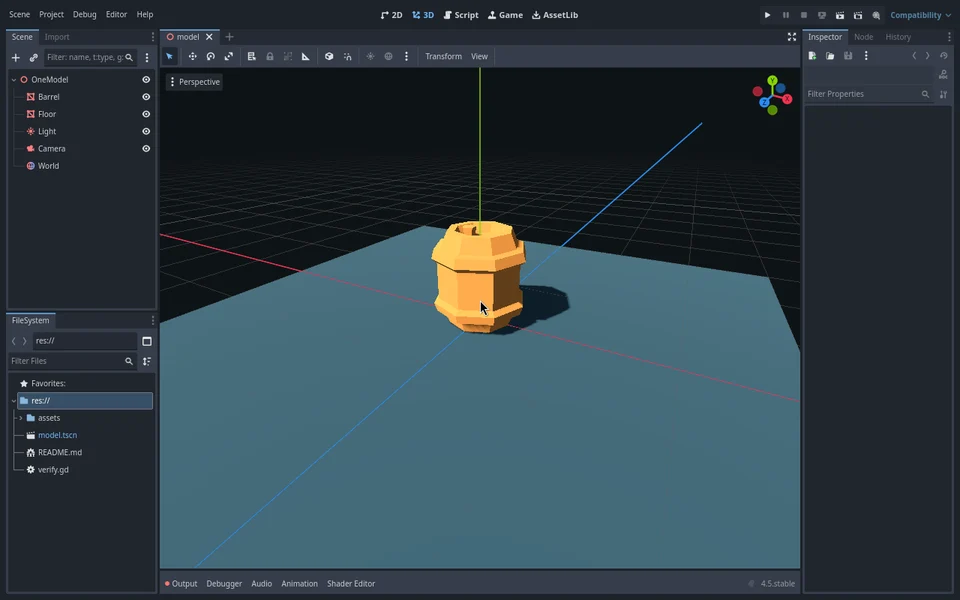
Existing tested OBJ barrel import, not the new prop or a Blender export demonstration. - STEP 5
Run, compare and keep the result
Run the scene, then test a small build on your intended target. Check visibility, size, orientation, materials and loading. Compare with the placeholder from step 1. Collision is a separate setup: if the prop must block movement, add and test the engine’s collision shape. An imported file alone does not establish that.
If something fails, keep the previous working version, record the file format and versions, and fix one issue before re-exporting. Keep the .blend source, export settings and rights notes when moving the successful asset into your game.
Check: You have recorded what works in your engine and target build, and which behaviours remain untested.
Version-specific instructions and limits
This is a source-reviewed workflow, not a newly executed Blender-to-engine test. The existing Godot barrel walkthrough tests geometry only. GLB, your own export, materials, collision, animation and target builds require their own checks. Direct .blend import in Godot calls an installed Blender; exported glTF avoids that dependency for collaborators. Other engines need their own importer instructions.
Blender 5.2: mesh primitives ↗
Blender 5.2: applying transforms ↗
Want help planning the import? Share public facts and details you choose. Purchased files, private code and project notes are not included.
Plan the import with my AI